Write a native app the way you write a web page.
Rux is a pure-Rust UI language: familiar template / style / script sections and literal CSS, laid out by a real flexbox and grid engine and painted on the GPU. No browser. No webview. No JavaScript.
Early and experimental (0.x) · MIT · desktop today, mobile next
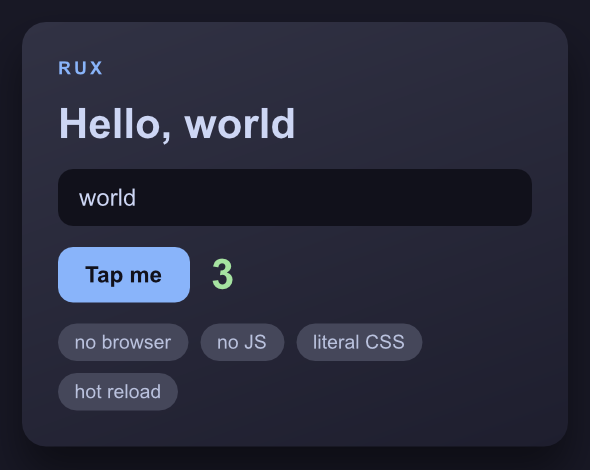
examples/showcase.rux, running in a native window
The whole app, in one file
That window is this file — all of it. No layout widgets, no JSX, no .slint DSL,
no JavaScript. <template> says what the content is, <style> is literal CSS
that says where it goes and how it looks, <script> holds the state.
<template>
  <screen class="app">
    <view class="card">
      <text class="eyebrow">RUX</text>
      <text class="title">Hello, {{ name }}</text>

      <input class="field" r-model="name" placeholder="your name" />

      <view class="row">
        <button class="btn" @tap="taps = taps + 1">
          <text class="btn-label">Tap me</text>
        </button>
        <text class="count">{{ taps }}</text>
      </view>

      <view class="tags">
        <view class="tag" r-for="t in tags">
          <text class="tag-label">{{ t }}</text>
        </view>
      </view>
    </view>
  </screen>
</template>

<style>
  .app  { display: flex; justify-content: center; padding: 28px; background: #181825; }
  .card {
    display: flex;
    flex-direction: column;
    gap: 14px;
    width: 100%;
    padding: 24px;
    background: linear-gradient(160deg, #313244, #1e1e2e);
    border-radius: 16px;
    box-shadow: 0 18px 40px rgba(0, 0, 0, 0.45);
  }
  .title { color: #cdd6f4; font-size: 28px; font-weight: 700; }
  .btn   { padding: 10px 18px; background: #89b4fa; border-radius: 10px; cursor: pointer; }
  .count { color: #a6e3a1; font-size: 28px; font-weight: 700; }
  .tags  { display: flex; flex-wrap: wrap; gap: 8px; }
  .tag   { padding: 5px 11px; background: #45475a; border-radius: 999px; }
</style>

<script>
  let name = signal("world");
  let taps = signal(0);
  let tags = signal(["no browser", "no JS", "literal CSS", "hot reload"]);
</script>
Type in the field and the heading changes as you type — r-model binds it to the
signal, and {{ name }} reads it back. Tap the button and the count moves. Edit
the file with the window open and it reloads live.
The full file is examples/showcase.rux
(the CSS above is trimmed a little for length).
Run it
git clone https://github.com/Aine-dickson/rux
cd rux
cargo run -p rux-cli -- examples/showcase.rux
That opens a real native window. There is no browser and no webview anywhere in the stack: taffy lays it out, parley shapes the text, vello paints it on the GPU, winit holds the window.
What works today
- flexbox + CSS grid
- the full box model
- px / % / rem / vw / vh
- gradients
- box-shadow
- transform
- fonts + text shaping
- text inputs + caret
- selection + clipboard
- select / textarea
- checkbox / radio
- keyboard focus + Tab
- scrolling + scrollbars
- images
- signals & bindings
- r-for / r-if / r-model
- components
- hot reload
- HiDPI
The exact honored-CSS set lives in 05-as-built.md — the
authoritative "what actually works" doc. What's missing is written down just as
plainly: CSS variables, @media, and pseudo-classes (:hover, :focus,
:checked) are the biggest gaps, and a signal change still rebuilds the whole
tree.
Rux is 0.x and experimental. It is not trying to replace Flutter, React Native, or Slint — those are mature, and if you need to ship an app this quarter you should use one of them. Rux exists to find out whether one specific corner — CSS-authored, Rust-native, no DSL, no JS — is a nicer place to build. The honest version of that argument, including where Rux isn't novel, is here.
Read on
- Why Rux? — the thesis, the four laws, and where Rux genuinely isn't novel.
- How it works — the pipeline from
.ruxfile to pixels. - Blog — release notes, written every release.